


FRAYT Driver
3.6240.00 Reviews
App Specs
- Version
- 3.14.4
- Updated On
- License
- Free
- Downloads
- 100,000+
- Developer
- FRAYT
- Categories
- Maps & Navigation
- Platform
- Android
Screenshots
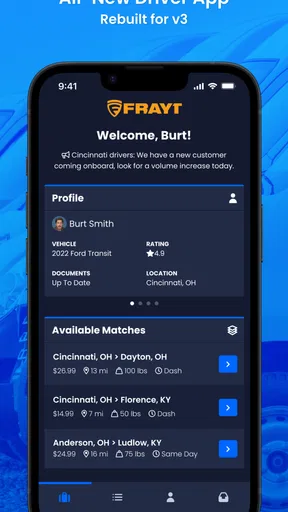
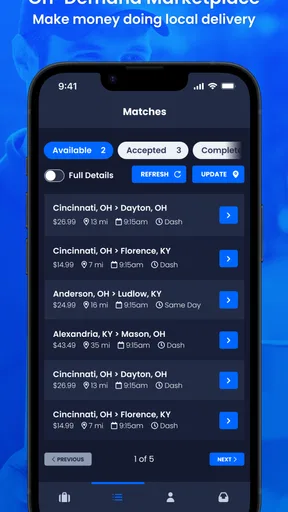
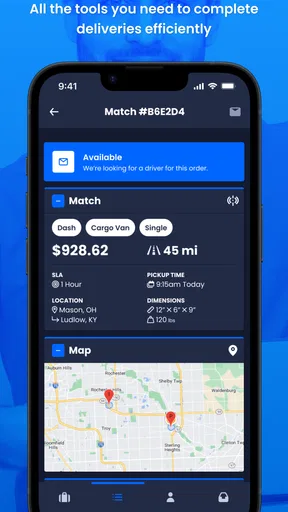
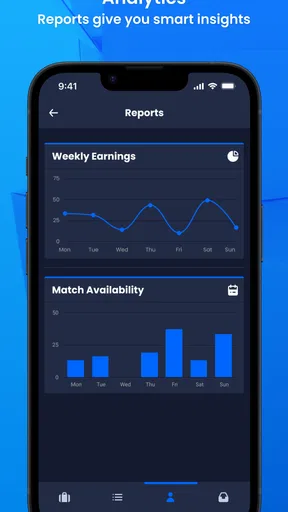
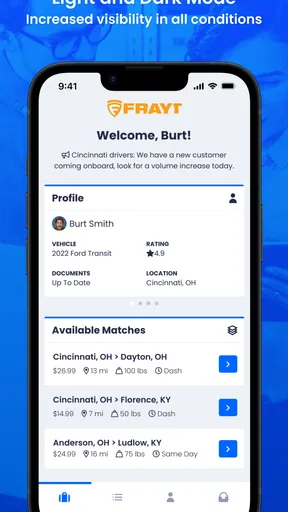
 Analysis by AppCompare
I approached FRAYT Driver as a working driver would: not as a casual map, but as a tool that needs to fit into a moving day filled with pickups, drop-offs, changing attention, and practical decisions. It is a free Maps & Navigation app from FRAYT, built for drivers using the FRAYT delivery service. That focus matters because its value is less about exploring a city and more about helping a driver handle assigned work with as little friction as possible.
My overall impression is mixed but useful. The app has a clear purpose, and the dedicated driver approach can feel more relevant than trying to manage delivery work through a general navigation app alone. At the same time, a driver app is only as helpful as its readability, timing, and ease of use under pressure. Small points of confusion matter more when someone is parked briefly, carrying items, dealing with traffic, or trying to keep their attention on the road. I would recommend trying it if FRAYT work is already part of your routine, but I would not treat it as a complete replacement for every navigation and accessibility tool on a phone.
How clearly the app supports a driver’s route
The first thing I look for in a delivery app is whether I can understand the next action quickly. A driver should not have to interpret a complicated screen while standing beside a vehicle or preparing to leave a pickup location. Because FRAYT Driver is designed around FRAYT driving tasks, its usefulness comes from keeping the work context together rather than forcing the driver to reconstruct it from messages, notes, and a separate navigation app.
That dedicated focus is one of the strongest reasons to use it. A general map app is good at finding places, estimating travel, and offering alternate routes, but it does not automatically understand the difference between a pickup, a delivery, and the operational steps around a job. FRAYT Driver is aimed at the driver side of that process. In practical terms, I would open it before starting work, review the job information, and use it as the place to orient myself before switching attention to the road.
The most useful habit is to prepare before moving. I would check the next stop while parked, confirm the address and any visible job details, and only then begin driving. This is not just a safety preference. It also reduces the chance of making a rushed decision after pulling away, especially when a delivery location has a confusing entrance, a large building, or several nearby roads with similar names.
Readability is not only about font size. It also includes the order in which information appears, how much is shown at once, and whether important actions are visually distinct from secondary details. Drivers with reduced vision, reading difficulties, or limited concentration may benefit from a simple sequence: review the stop, identify the required action, and avoid exploring the rest of the screen until the vehicle is safely parked. If the interface feels dense on a smaller phone, a larger display can make the same workflow easier without changing the app itself.
The app is available for devices using a relatively modern mobile operating system, with version 3.14.4 listed as the current version. That is worth checking before a driver relies on it for work. A phone that is old, slow, or nearly full can make any operational app feel less responsive, and delays become especially frustrating when a driver is trying to move through several stops.
Worth Reading Before You Choose

EA SPORTS FC Mobile 26 Is a Bigger Football Game, but It Takes Time

Flipboard Shows What News Apps Must Do Beyond the Feed

Switching to Android Auto Means Rethinking Your Driving Routine

Google Calendar Makes a Crowded Week Easier to Manage

Ludo King Makes the Most of the Minutes Between Plans

Baby Panda World Brings Quick Play to Modern Phones, but Its Game Library Feels Busy
Using it alongside ordinary navigation
I would not assume that a driver-specific app has to replace a familiar navigation tool. In my preferred workflow, FRAYT Driver would handle the work context while the phone’s usual navigation option handles the route itself when that is more comfortable. This division can be helpful for drivers who already know which map display, voice guidance style, or contrast setting works best for them.
There is a trade-off, though. Moving between apps can increase mental load. A driver who needs large text, strong contrast, voice guidance, or a particular map layout may find a separate navigation tool easier, but switching back and forth can create missed steps. I would make the choice based on the task: use FRAYT Driver while parked to understand the assignment, then use the navigation method that gives the clearest driving guidance, returning to the driver app only when stopped.
This approach is also useful for people who are new to delivery work. Instead of trying to learn every screen while driving, they can build a repeatable routine around the app. Review the next job, identify the destination, plan the route, secure the phone, and leave. After arriving, stop completely before checking the next instruction. A consistent sequence is often more accessible than relying on memory when the day becomes busy.
Readability, motor effort, and sensory demands
Accessibility is not a single switch. A driver may have reduced vision, hand tremors, limited reach, hearing loss, attention differences, or sensitivity to bright and crowded screens. FRAYT Driver should therefore be judged by how well it fits with the phone’s existing accessibility settings and by how much interaction it demands at each stage of a job.
For readability, I would start with the device rather than immediately changing my driving habits. Larger system text, display zoom, a suitable brightness level, and a clear screen protector can make a meaningful difference. The practical test is whether the next required action can be recognized while parked without leaning close to the phone or repeatedly rereading the same information. If a driver needs to enlarge everything dramatically, some screens may become harder to scan because less content fits at once. That is a real trade-off: bigger text improves legibility, but it can increase scrolling or make the workflow feel less compact.
Drivers with color-vision differences should be cautious about relying on color alone to understand status or priority. I would look for text labels, icons, or other visual confirmation before assuming that a color change communicates a critical update. If a status is hard to distinguish, taking a screenshot while parked and enlarging it may help with a one-time check, but it is not a substitute for a clear interface. The safest workflow is to confirm the meaning of an action before leaving the vehicle.
Motor accessibility deserves equal attention. Delivery work can require repeated tapping during short stops, sometimes while wearing gloves, carrying items, or using a phone mount. Small controls and closely spaced buttons are more difficult for anyone with limited dexterity. I would avoid operating the app while holding packages and would set the phone where it can be reached without twisting or stretching. A stable mount and a deliberate parked workflow reduce the need for quick, precise taps.
One useful adjustment is to separate information gathering from action confirmation. I would read the job details first, then perform the required update as a distinct step. That makes it easier to notice whether the intended button was actually pressed and reduces accidental taps caused by rushing. It also gives a driver with motor limitations a chance to steady the hand before committing to an action.
People who depend on spoken feedback should think about how the app fits with their phone’s screen reader or voice-control features. I would test that combination while parked before accepting real work. A screen reader may make text accessible but also change the order in which controls are announced, while voice control may struggle with similarly named buttons or changing content. The key question is not whether the phone has an accessibility feature, but whether the complete FRAYT workflow remains understandable with that feature active.
For drivers with hearing loss, visual confirmation becomes particularly important. I would not depend on sounds or alerts alone to signal a change in a job. Checking the screen at safe moments and keeping the phone’s visual notifications easy to notice is a more dependable approach. Conversely, drivers sensitive to sound may prefer a quieter setup and should make sure that reducing audio does not remove the only cue they rely on.
A realistic delivery-day routine
Imagine starting a morning with several assignments and limited time between them. Before leaving, I would open FRAYT Driver, review the first stop, and make sure I understand what needs to happen there. I would then set up navigation, place the phone securely, and begin driving without trying to read new information on the move.
On arrival, I would park legally, take a moment to orient myself, and use the app only after the vehicle is stationary. If the location is a large complex, I would compare the address with the building entrance before walking away from the vehicle. After completing the stop, I would update the job while still parked, then prepare the next route. This routine adds a few seconds at each stage, but it can prevent a much longer pause caused by an incorrect entrance, a missed instruction, or a return to the vehicle.
This scenario also shows where the app is most inclusive: it can support a driver who benefits from predictable steps and deliberate pauses. It is less suitable for someone who expects every part of the process to be hands-free or who cannot comfortably interact with a phone during repeated stops. The app may be part of an accessible setup, but it does not remove the physical and attentional demands of delivery work.
Access in changing real-world situations
A driver rarely works in ideal conditions. Bright sunlight, rain, nighttime glare, a vibrating vehicle, unfamiliar buildings, poor parking options, and time pressure can all affect how usable an app feels. I would judge FRAYT Driver by how well it supports short, controlled interactions rather than by how attractive it looks in a calm indoor setting.
Outdoor readability can change dramatically. A screen that is comfortable in a vehicle may become difficult to read in direct sun, while maximum brightness can create glare in low light. I would adjust the phone before beginning the route and avoid placing it where reflections obscure the important part of the screen. Drivers with low vision may find that a larger phone or a matte screen treatment helps more than repeatedly changing the app’s display.
Weather introduces a motor and sensory challenge. Wet fingers, gloves, and cold hands make precise touch interaction harder. My practical advice is to complete as much preparation as possible before leaving the vehicle and to avoid trying to operate the app while carrying anything. If a delivery requires walking away from the car, I would decide in advance what information needs to be remembered or safely checked later rather than keeping the phone in hand throughout the stop.
People with mobility limitations may need extra planning around parking and walking distance. A driver who cannot move quickly between a vehicle and a building should consider whether the job’s physical demands fit their abilities before accepting a busy schedule. FRAYT Driver can organize the driver-side workflow, but it cannot make a distant entrance closer, remove stairs, or guarantee that a loading area will be convenient.
Attention differences also deserve a realistic discussion. The app may help by giving delivery work a dedicated place, but notifications, route changes, and repeated transitions can still be distracting. I would silence unrelated phone alerts during a shift, prepare the next stop only when parked, and use a written or mental checkpoint such as “park, read, act, confirm.” That small structure can be valuable for drivers who lose their place when interrupted.
For someone who shares a phone, has limited data, or works with an older device, reliability becomes part of accessibility. I would test the app on the actual phone used for driving, not only on a newer spare device. A workflow that feels fine at home may become frustrating when the phone is mounted, the battery is low, or another navigation tool is open. Keeping the device charged and closing unnecessary apps is sensible preparation, although no setup can eliminate every technical interruption.
Where the experience still has barriers
The biggest limitation is that a specialized driver app is not automatically an accessible driver app. Its dedicated purpose is helpful, but drivers still have to read, interpret, tap, travel, park, carry, and confirm. Anyone who needs completely hands-free operation, highly customized visual presentation, or extensive support for complex mobility needs should test the full workflow before depending on it for income.
The relationship with ordinary navigation tools can also create friction. General map apps often offer mature route views and familiar accessibility controls, while FRAYT Driver is the more relevant place for the delivery assignment itself. Using both may provide the best result, but it can also mean remembering which app contains which information. I would keep one clear rule: the driver app is for the job context, and the navigation tool is for getting there, unless the actual workflow proves simpler another way.
New drivers may also need time to build confidence. A store summary can explain the app’s purpose, but it cannot prepare someone for the physical rhythm of delivery work. I would begin with a low-pressure practice session while parked, learning how to locate the next assignment, review its details, and complete the expected update. That is especially important for anyone using a screen reader, magnification, voice control, or a nonstandard touch method.
Another barrier is the environment around the app. A driver may reach the correct address and still face an inaccessible entrance, unclear building layout, heavy doors, or a long walk from the parking area. The app can guide the operational part of the job, but inclusive access depends on the destination as well. Drivers should be honest about which physical tasks they can perform safely and avoid assuming that every stop will offer the same conditions.
The public response suggests a product that is useful to a meaningful group of drivers but not universally smooth: it holds an average rating of 3.7 from around 1.3 thousand ratings, with more than 200 written reviews and over 100 thousand installs. I see those figures as a reason to approach it practically rather than emotionally. It has enough adoption to be a serious tool for its intended audience, while the middling rating is a reminder to test it against your own phone, route habits, and accessibility needs.
Who should use it and who should look elsewhere
I think FRAYT Driver is best suited to someone who already drives for FRAYT and wants a dedicated place to manage the driver side of that work. It is also a reasonable choice for a person who likes a focused workflow and is comfortable combining a delivery app with a preferred navigation tool. Drivers who can prepare stops while parked and who do not need extensive hands-free interaction are the most likely to get value from it.
I would be more cautious if you are choosing an app mainly for ordinary personal navigation. This is not the reason I would install it. Someone looking for walking directions, public transit planning, broad map exploration, or a highly customizable navigation experience will probably be better served by a conventional maps app. The FRAYT connection is the point, so outside that context its usefulness is limited.
I would also hesitate to recommend relying on it without testing if you have significant vision, hearing, motor, or cognitive access requirements. That does not mean it is unusable; it means the complete setup matters. Try the app with your preferred phone settings, mount, navigation method, and interaction style while stationary. If the next action is consistently easy to identify and complete, it may fit well. If you need to improvise every time, another workflow may be safer.
The app is free and intended for Everyone, which makes trying it relatively straightforward from a cost and age-rating perspective. Still, free access does not remove the need to evaluate the practical demands of the work. The better question is whether the app helps you perform FRAYT tasks with fewer confusing transitions and whether your phone setup supports safe use.
An inclusive verdict for FRAYT drivers
After looking at it through the lens of readability, motor effort, sensory demands, and changing delivery conditions, I see FRAYT Driver as a focused work companion rather than an all-purpose accessibility solution. Its strongest quality is its purpose: it is made for FRAYT drivers, so it can give the delivery workflow a clearer home than a collection of messages and unrelated apps. That focus can make a busy route easier to organize.
Its limits are just as important. The app cannot guarantee that every screen will suit every visual preference, that every action will be comfortable for limited dexterity, or that every delivery location will be physically accessible. Drivers who need hands-free control or unusually strong customization should test it carefully and keep a backup plan for navigation and communication.
My recommendation is simple: if you drive for FRAYT, install it and evaluate it during a parked practice run before making it central to your routine. Set up your phone for legibility, decide which tool will handle navigation, and create a repeatable stop-by-stop process. If that arrangement lets you read, act, and confirm without rushing, the app is likely worth keeping. If it adds more switching and uncertainty than it removes, a different combination of tools may serve you better.
FRAYT Driver was released on June 20, 2023, and FRAYT remains the developer behind it. For a driver who wants a dedicated operational app and can adapt the surrounding phone setup, it is a sensible free option to try. I would recommend it with one condition: treat accessibility as something to verify in your own working environment, not as a promise made by the app’s category or purpose.
Pros
- Flexible delivery work with control over when you accept jobs.
- Clear pickup and drop-off details help you plan each route.
- Useful for drivers with cargo vans
- box trucks
- or larger vehicles.
- In-app status updates keep customers informed during deliveries.
- Can provide access to local and regional delivery opportunities.
Cons
- Earnings may vary significantly based on demand and available routes.
- Some loads may require waiting at pickup or delivery locations.
- Vehicle
- fuel
- insurance
- and maintenance costs reduce take-home pay.
- The app may require reliable GPS and mobile data throughout each job.
- Delivery requirements can differ
- so careful load and vehicle checks are essential.
FAQs for FRAYT Driver
What is FRAYT Driver, and who can use it?
FRAYT Driver is a delivery app designed for independent drivers who want to find and complete on-demand or scheduled freight and package delivery jobs. It is generally intended for people using a car, van, pickup truck, or other qualifying vehicle, depending on the available routes. Drivers should review the current eligibility requirements, service areas, insurance rules, and vehicle standards before signing up, because availability can vary by location.
How do I sign up and get approved as a FRAYT Driver?
To become a FRAYT Driver, you typically need to create an account, provide personal and vehicle information, submit required documents, and complete any identity, background, or driving-record checks requested during registration. Approval is not always immediate, and the exact process may depend on your location and the type of deliveries you want to accept. Make sure your license, insurance, registration, and contact details are current.
How do drivers find and accept delivery jobs in the app?
After approval, FRAYT Driver can display delivery opportunities that match your location, vehicle type, and account eligibility. You can review important details such as pickup and drop-off locations, timing, shipment information, and estimated compensation before deciding whether to accept a job. Drivers should check every instruction carefully, since some deliveries may involve specific handling requirements, multiple stops, waiting time, or proof-of-delivery procedures.
How much can I earn with FRAYT Driver, and when are payments made?
Earnings depend on the delivery offers available in your market, the distance and complexity of each route, vehicle expenses, and how many jobs you complete. The amount shown for a delivery may not represent your final profit after fuel, maintenance, taxes, insurance, and other costs. Payment schedules, methods, bonuses, and adjustment policies can change, so drivers should review the current in-app payment information before relying on FRAYT as a primary income source.
What should I know about delivery requirements, support, and driver responsibilities?
Drivers are usually responsible for arriving on time, safely loading and transporting shipments, following customer or warehouse instructions, and recording successful completion through the app. Some orders may require signatures, photos, scanning, or notes about delays and delivery problems. If an issue occurs, use the app’s support options as soon as possible and keep clear records. Reliable communication and careful handling are important for protecting your ratings and account status.


